
NEW SiteFit is free and instant
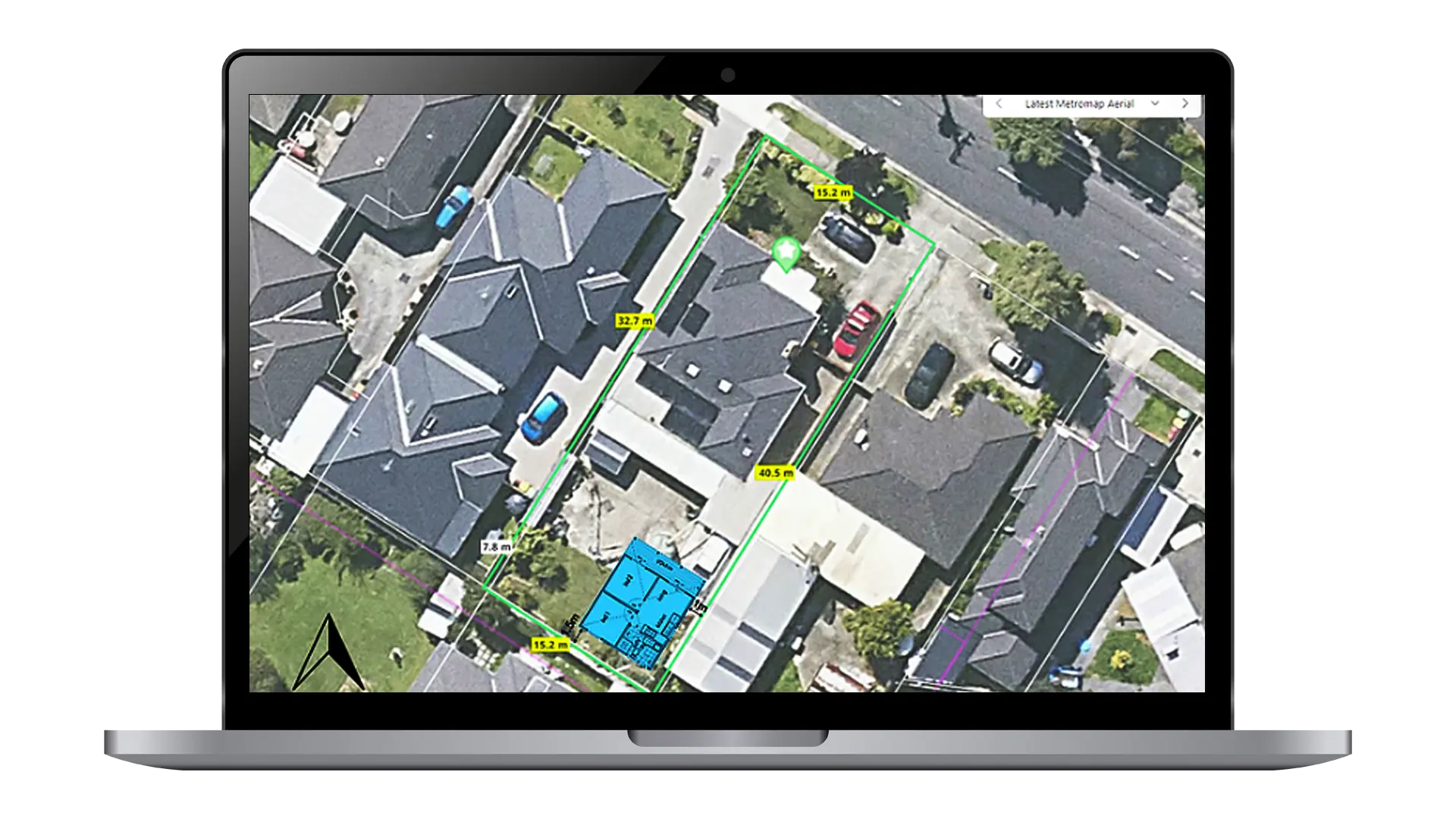
See your iBuild home on your block, in real time
Pick a design, enter your address and SiteFit places it on a satellite view of your land in seconds. Move it, rotate it, try other designs, then save a PDF. No cost, no waiting and no obligation.
- Free
- Results in seconds
- Try as many designs as you like
- 100+ iBuild designs
- No obligation
Preliminary visualisation only. Not a site assessment, and not confirmation that you can get a permit. Read the important information.
What you can do in SiteFit
Answer “will it fit?” before you spend a dollar
It’s not just the square metres. Two homes with the same floor area can have very different shapes, and every block is different. SiteFit shows you the real footprint on your real land.
- 1
Your block, measured
Enter your address and SiteFit draws your boundary with its dimensions over a satellite view.
- 2
Three ways to see it
Switch between a 3D bird’s-eye illustration, the 2D floor plan and a simple size envelope.
- 3
Move and rotate
Drag the home into place, turn it to suit the sun or the view, or let SiteFit suggest a spot inside the block.
- 4
Compare designs
Filter by bedrooms and swap between 100+ iBuild designs without starting again.
- 5
Real dimensions
Each design shows its overall width and depth, taken from its floor plan, so you know the true footprint.
- 6
Save a PDF
Keep a copy to share with your family, your builder or your building surveyor.
How it works
Four steps, about a minute
You can also start SiteFit from the “Will this design fit my block?” button on any iBuild design page.
Choose a design
Pick one above, or start with any design and change it later.
Tell us where
Enter your site address and your contact details so our team can help with next steps if you want them.
See it on your block
SiteFit opens straight away with the design on a satellite view of your land. Move it, rotate it, try others.
Save and talk to us
Save a PDF. When you’re ready, our team can contact you about approvals, pricing and delivery.
Next time you visit, SiteFit remembers you, so you can go straight to the map.
Preliminary visualisation only. Not a site assessment, and not confirmation that you can get a permit. Read the important information.
Who uses SiteFit
Useful whatever you’re planning
SiteFit helps with the first question on almost every project: is there room?
A granny flat in the backyard
Check that a design within your state’s size limit leaves room for the main house, the yard and access down the side.
Granny flat size limits by state ›A new home on vacant land
See how a family home sits on your block in a suburb or in regional locations before you choose a design.
Browse kit home designs ›A custom or modified design
Use the closest iBuild design to test the footprint, then contact our team to talk about the changes you have in mind.
Custom design service ›Important information
SiteFit is a visualisation, not an assessment
SiteFit shows how a design may sit on your block. Whether you can build it, and where, depends on your council’s rules and your site conditions, which SiteFit does not check. Please read the following before relying on a SiteFit result.
What SiteFit gives you
- An indicative representation of your chosen design on your site
- A satellite imagery overlay with an approximate block outline
- A preliminary visual to support early planning and discussions
What SiteFit is not
- Not a site assessment, feasibility study or survey
- Not a formal site plan, and not architectural, engineering or planning documentation
- Not confirmation that you can get a planning or building permit
- Not advice that a design complies with any law, rule or standard
Limitations and disclaimer
A SiteFit result is a preliminary visualisation only. It provides an indicative representation of how the selected design may fit on the site address entered. Accuracy is not guaranteed.
SiteFit does not assess, and its result does not take into account:
- Local council regulations, zoning requirements, development controls or size limits for second dwellings
- Easements, setbacks, site coverage, covenants, caveats or title restrictions
- Heritage, bushfire (BAL), flood, landslip or biodiversity overlays and constraints
- Site conditions, including slope, soil, drainage, trees, existing buildings, driveways, access and services (sewer, water, power and stormwater)
- Any other legal, regulatory or engineering requirement
The block outline comes from third-party property data and may not match your actual title boundaries. Satellite imagery is sourced from third-party providers and may be affected by angle, scale or capture date. The 1.5 m guide shown around the home is a visual guide only; it is not a council setback.
A design appearing to fit on SiteFit does not mean you will be able to obtain a planning permit, building permit or any other approval. It is your responsibility to verify all planning, regulatory and development requirements with your local council, a registered building surveyor or other relevant authority before making any decision or commitment.
iBuild accepts no liability for any decision made based on a SiteFit visualisation.
Questions
SiteFit FAQs
Is SiteFit really free?
Yes. SiteFit is free to use and there’s no obligation to buy. It’s fully automated, so there’s nothing to pay.
Why do you ask for my contact details?
So our team can help with next steps if you want them, such as approvals, pricing and delivery. You only enter them once; SiteFit remembers you on your next visit.
Can I try more than one design?
Yes. Inside SiteFit you can filter by bedrooms and switch between more than 100 iBuild designs, as many times as you like.
Is SiteFit a site assessment?
No. SiteFit shows how a design may sit on your block. It does not check council rules, overlays, easements, setbacks or site conditions such as slope, soil and services, and it does not mean you can get a permit. See the important information above.
Does SiteFit tell me if I can build a granny flat?
No. SiteFit shows whether a design physically fits on your block. Each state also sets rules such as size limits, lot size, zoning and setbacks. See granny flat size limits by state and check with your council or building surveyor.
Can I use the PDF for council or a permit?
No. The PDF is a preliminary visualisation for early discussions. It is not a site plan and cannot be used for planning or building approvals.
What if I want a custom design?
Start with the closest iBuild design to test the footprint, then contact our team about the changes you have in mind.
Will it fit your backyard?
Find out free, in about a minute.
Preliminary visualisation only. Not a site assessment, and not confirmation that you can get a permit. Read the important information.